海光DCU在Proxmox VE中的虚拟化直通记录
1. 环境准备
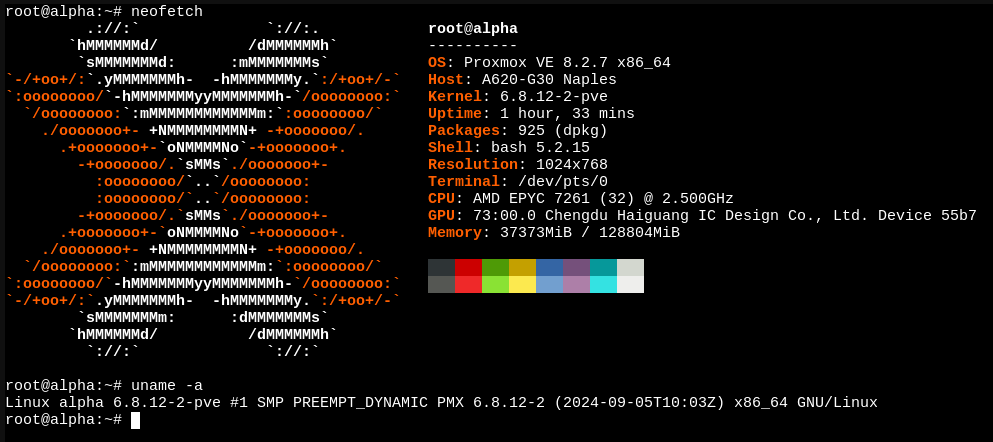
干净安装的 Proxmox VE 一则
配置:
CPU: AMD EPYC 7251*2
GPU: 海光DCU Z100L*2
2. 开启IOMMU
法1
- 进入 BIOS
- 定位到 AMD CBS
- 在 NB Configuration 中打开 IOMMU
- F10
法2
- 打开 BMC - Remote Control - BIOS configuration
- 定位到 IO Option
- IOMMU change to Enable
grub 修改
- 打开 /etc/default/grub
- 修改 GRUB_CMDLINE_LINUX,加入 amd_iommu=on iommu=pt
- update-initramfs -u -k all
GRUB_CMDLINE_LINUX="amd_iommu=on iommu=pt"
3. 加载DCU补丁
本部分参考https://download.sourcefind.cn:65024/directlink/5/DCU直通插件/DCU虚拟化直通操作手册-v2.0.0.pdf
- 下载补丁 https://download.sourcefind.cn:65024/directlink/5/DCU直通插件/hydcu_pci_fixup_header_0.4.1.bin
- 安装缺少的环境
- 编译、加载补丁
# 下载补丁
$ wget https://download.sourcefind.cn:65024/directlink/5/DCU直通插件/hydcu_pci_fixup_header_0.4.1.bin
$ chmod +x hydcu_pci_fixup_header_0.4.1.bin

# 安装环境
$ apt install gcc build-essential linux-headers-$(uname -r)

# 编译安装补丁
$ ./hydcu_fixup_header.bin
$ depmod

# test一下
$ lsmod | grep -i fix
hydcu_pci_fixup_header    12288  0
⚠️⚠️⚠️务必确保在配置虚拟机期间补丁被加载⚠️⚠️⚠️
4. 启用 vfio_pci
- 加载vfio_pci
- 开机自启动
# 加载 vfio-pci 模块
$ modprobe vfio-pci

# 查看加载情况
$ lsmod | grep vfio
vfio_pci               16384  1
vfio_pci_core          86016  1 vfio_pci
irqbypass              12288  2 vfio_pci_core,kvm
vfio_iommu_type1       49152  1
vfio                   65536  7 vfio_pci_core,vfio_iommu_type1,vfio_pci
iommufd                94208  1 vfio

# 设置开机自动加载模式
$ echo “vfio-pci” > /etc/modules-load.d/vfio.conf
5. 配置 vfio
注意:由于我们没有在 host 环境中安装任何驱动,而 PVE 本身又无法驱动海光 DCU,因此无须将驱动黑名单,但为了保险起见,你仍然可以检查一下:
$ lspci -k | grep -A 3 "Display"
23:00.0 Display controller: Chengdu Haiguang IC Design Co., Ltd. Device 55b7 (rev 01)
        Subsystem: Chengdu Haiguang IC Design Co., Ltd. Device 55b7
        Kernel driver in use: vfio-pci
24:00.0 Non-Essential Instrumentation [1300]: Advanced Micro Devices, Inc. [AMD] Zeppelin/Raven/Raven2 PCIe Dummy Function
--
73:00.0 Display controller: Chengdu Haiguang IC Design Co., Ltd. Device 55b7 (rev 01)
        Subsystem: Chengdu Haiguang IC Design Co., Ltd. Device 55b7
        Kernel driver in use: vfio-pci
74:00.0 Non-Essential Instrumentation [1300]: Advanced Micro Devices, Inc. [AMD] Zeppelin/Raven/Raven2 PCIe Dummy Function
请确定 Kernel driver in use 为 vfio-pci
- 查找设备 id
- 配置 vfio_pci 的开机启动、禁用 vga
# 查找设备 id
$ lspci -nn | grep -i disp
23:00.0 Display controller [0380]: Chengdu Haiguang IC Design Co., Ltd. Device [1d94:55b7] (rev 01)
73:00.0 Display controller [0380]: Chengdu Haiguang IC Design Co., Ltd. Device [1d94:55b7] (rev 01)

# 配置 vfio_pci,注意根据设备 id 修改对应值
$ echo "options vfio-pci ids=1d94,55b7 disable_vga=1" > /etc/modprobe.d/vfio.conf
6. 配置虚拟机
参考配置:
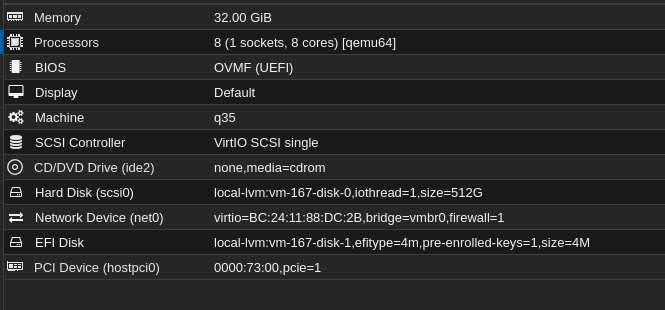
配置重点:
- 使用 q35 机型,UEFI 启动
- PCI 设备配置中,勾选 All functions, ROM-bar, PCI-Express
7. 杂项
虚拟机镜像推荐:
参考 https://download.sourcefind.cn:65024/1/main/DTK-24.04.3 中支持的系统